60-DAY Money back guarantee
Les stickers animés personnalisés transforment les stories Instagram ennuyeuses en contenu captivant. Mais soyons honnêtes, la fonction de recherche de stickers GIF intégrée à Instagram laisse à désirer. (Un petit 📣 « Intégration Giphy x Instagram ratée », ça vous dit ?) Même quand on sait qu'un sticker est disponible sur Giphy, il n'apparaît souvent pas dans les résultats de recherche d'Instagram. Mais pas de panique ! On a la solution pour vous permettre d'utiliser les stickers que vous rêvez d'utiliser dans vos stories Instagram, sans le moindre souci.
Avant de commencer, téléchargez l'application Giphy (elle est gratuite !) pour iPhone ou Android . C'est la plus grande collection en ligne de stickers animés. Créez un compte pour sauvegarder vos stickers préférés. Ainsi, vous pourrez les utiliser en un clic. Nous vous recommandons de suivre le compte Giphy de Beauty by Earth pour accéder à plus de mille stickers personnalisés, créés spécialement pour vous . De nouvelles collections sont ajoutées chaque mois : vous aurez toujours de nouvelles options. Téléchargez l'application Giphy.
D'accord, cette étape est facultative, mais c'est vraiment un excellent moyen de rester organisé. Assurez-vous d'être connecté à votre compte via l'application et d'avoir ajouté des stickers à vos favoris. Vous pourrez ainsi y accéder instantanément plus tard grâce à la navigation « Favoris ». Plus besoin de chercher ! Envie d'inspiration ? Voici notre liste incontournable de créateurs de stickers :
- @nurulaa
Et maintenant, la magie opère ! Avant de publier votre story, ouvrez l'application Giphy et trouvez le sticker de votre choix. Pensez à ajouter vos stickers à vos favoris pour y accéder rapidement. Il vous suffit d'aller dans vos favoris, de trouver le sticker et d'appuyer dessus pour le copier. Une fois copié, ouvrez à nouveau Instagram. Vous verrez alors une petite bannière affichant le sticker que vous avez copié depuis Giphy dans votre story ! Appuyez sur la bannière et votre sticker apparaîtra dans votre story ! Et voilà !
Clean skincare has never been so easy.
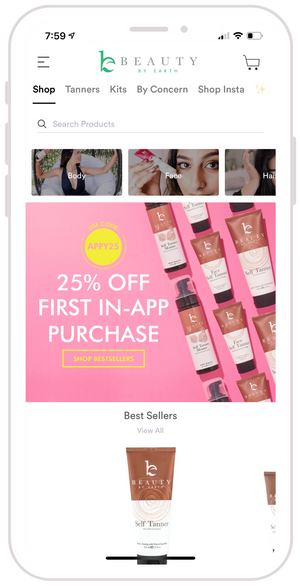
Get 25% off your first in-app order with code APPY25
Black Friday deals 2 weeks early!
Order your clean beauty faves on the go!
Get early access to new products a full7 daysearly
Enjoy app-exclusive gifts, add-ons, and discounts
Explore freebies (updated weekly!), meet the BBE fam, and read blog posts and other app-exclusive content
View previous orders + favorite items right from your phone
Watch demos and how-to's of all of our products
Get notifications when sales and new products drop


★★★★★
“I'm in love with this app! It keeps me logged in to my Beauty by Earth account, has all more orders right there, and (best of all) has all of these wonderful extras—videos, freebies, how-tos, articles. It's like all the things I love about Beauty by Earth x 10 💕 ”
— Lynn C, Beauty by Earth Customer
★★★★★
“This app is so fun! It makes shopping so much more engaging. LOVE IT!"
— Katie P., Beauty by Earth Customer